

Key Takeaways
Home Internet Connection Types
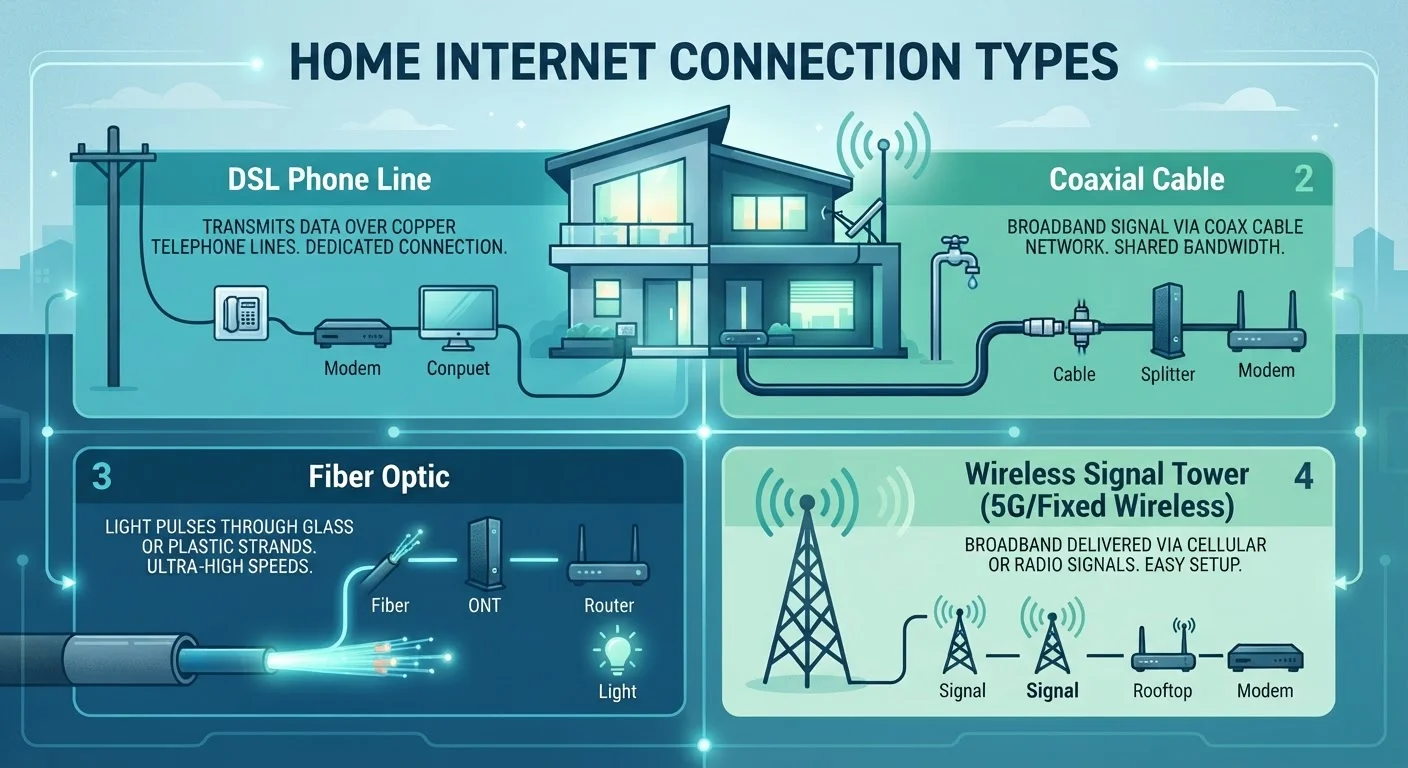
Home internet arrives through several distinct technologies - DSL, cable, fiber, and fixed wireless - each using different physical or wireless infrastructure to carry data between your home and the broader internet. The type available to you depends largely on where you live and what local providers have built. Understanding the differences helps you evaluate what you're getting and what trade-offs exist.
Each technology has a distinct last-mile delivery method: DSL uses copper telephone lines, cable uses coaxial lines originally built for TV, fiber uses glass or plastic strands that carry light pulses, and fixed wireless uses radio signals from a nearby tower.
DSL: Broad Coverage, Modest Speeds
DSL (Digital Subscriber Line) transmits internet data over the same copper telephone wires that carry landline phone service. Because this infrastructure already exists in most of the country, DSL has historically been one of the most widely available broadband technologies, especially in suburban and semi-rural areas.
Speeds vary considerably depending on how far your home sits from the provider's nearest equipment hub - often called a central office or DSLAM. Closer proximity typically means faster speeds; greater distance means degraded performance. Typical DSL download speeds range from around 1 Mbps to 100 Mbps, with uploads considerably slower.
For a single user doing light tasks - email, web browsing, or occasional streaming - DSL can be functional. But households with multiple simultaneous users or higher-bandwidth needs may find its ceiling frustrating. If you're weighing connection types and speed, estimating your household's actual bandwidth needs is a useful first step.
Check Distance When Evaluating DSL Plans
If DSL is your primary option, ask the provider about the distance from your home to their nearest equipment hub. Providers rarely advertise this, but it directly determines the maximum speed you'll actually receive. Homes close to the hub can receive near-advertised speeds; homes further away may see significantly less.
Cable: High Speeds, Shared Infrastructure
Cable internet travels over the same coaxial cable network originally built to deliver television service. Because this infrastructure reaches a large portion of American homes, cable is one of the most common broadband technologies available today.
Cable can deliver notably fast download speeds - often ranging from 100 Mbps to 1 Gbps or more depending on the plan and local network. However, a key structural characteristic shapes the experience: cable uses a shared network architecture. Homes in the same neighborhood node share available bandwidth, which can cause speeds to dip during high-usage periods like evenings and weekends.
Upload speeds on cable are also asymmetrical - typically much slower than downloads. This matters more than it once did, given how common video conferencing and cloud-based work have become. To understand how your connection type interacts with the equipment in your home, the difference between a modem, router, and gateway is worth understanding.
~43%
U.S. homes with access to fiber broadband
According to FCC broadband data, roughly 43% of U.S. locations had access to fiber-to-the-premises service as of recent deployment reports - leaving a significant share of the country dependent on cable, DSL, or wireless alternatives.
25 Mbps / 3 Mbps
FCC minimum broadband definition (download/upload)
The FCC has historically defined broadband as at least 25 Mbps download and 3 Mbps upload, though this benchmark has been debated as streaming and remote work demand more bandwidth.
~19 million
Americans without access to broadband
FCC reports estimate around 19 million Americans lack access to fixed broadband at the minimum threshold, with rural areas accounting for the majority of the gap.
Fiber: The Performance Benchmark
Fiber optic internet transmits data as pulses of light through thin glass or plastic strands, rather than electrical signals through copper or coaxial lines. This fundamental difference makes fiber exceptionally fast and highly resistant to signal degradation over distance.
The defining advantage of fiber is symmetrical speed: upload and download rates are typically equal, which matters significantly for video calls, remote work, gaming, and cloud storage. Fiber connections also tend to have very low latency - the delay between sending a request and receiving a response - making real-time applications perform noticeably better.
The catch is availability. Deploying fiber requires installing new underground or aerial cable, which is capital-intensive. Many urban and suburban areas now have access, but rural regions often do not. For a deeper look at how fiber differs from cable in real household use, see what actually changes at home between fiber and cable.
Fiber Availability Is Expanding
Federal and state broadband expansion programs have allocated significant funding to extend fiber infrastructure to underserved areas. If fiber isn't available in your area today, it may become an option within a few years depending on your location. Checking with your local government or state broadband office can provide information on planned deployments.
Fixed Wireless: The Rural Broadband Bridge
Fixed wireless internet delivers service through radio signals rather than buried cables. A provider installs a small antenna or receiver on or near your home - typically on the roof or an exterior wall - which communicates with a nearby wireless tower. No phone line or coaxial cable runs into your home.
This makes fixed wireless particularly valuable in rural and remote areas where running physical infrastructure is economically impractical. As long as there's a relatively clear line of sight - or a sufficiently strong signal - between your antenna and the tower, service can be reliable.
Speeds vary by provider and technology, but many modern fixed wireless services can deliver 25 Mbps to 100 Mbps or more. Latency is generally higher than fiber but comparable to or better than satellite. Weather and terrain can affect signal quality, so performance may fluctuate. If you're starting from scratch evaluating options, a first-timer's complete overview of internet connectivity covers the full decision process.
What Your Connection Type Actually Affects
The distinction between these technologies isn't just academic - it shapes your daily experience in concrete ways. Upload speed, latency, and consistency during peak hours all vary significantly by connection type, and those factors affect real activities like video calls, streaming, gaming, and working from home.
It's also worth noting that the quality of your in-home network plays a role. Even a fast fiber connection won't perform well if your Wi-Fi setup has coverage gaps. If certain rooms in your home struggle with connectivity, understanding why Wi-Fi dead zones form can help you address the issue separately from your connection type.
Many consumers also hold misconceptions about what determines internet speed - not all of them related to connection type. Common myths about internet speed are worth reviewing before drawing conclusions about your service. For a comprehensive view of how all the pieces fit together, the complete consumer guide to home internet is a useful broader reference.
“The type of internet connection you have matters as much as the speed tier you pay for. A fiber connection at 100 Mbps will often outperform a cable connection at the same advertised speed - especially for upload-heavy tasks and during peak hours.”
— Tech & Connectivity Editorial Team, Editorial analysis based on published FCC and ISP performance data