

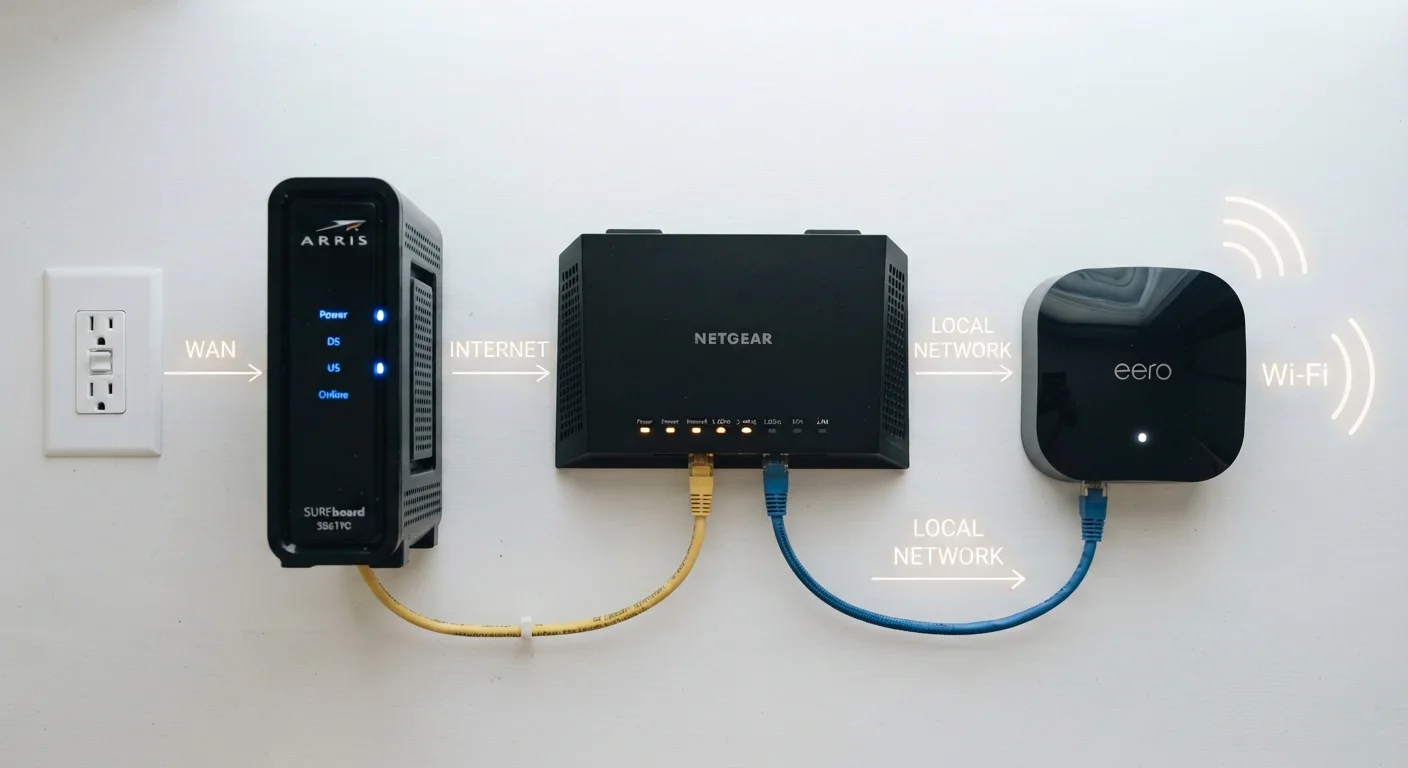
| Modem's core job | Converts ISP signal to a usable digital connection |
| Router's core job | Distributes that connection to devices via Wi-Fi or ethernet |
| Gateway definition | One device combining modem + router functions |
| Typical ISP-supplied equipment | Gateway (combo unit) in most US cable and DSL plans |
| Can you use your own modem? | Yes, if it's on your ISP's approved device list |
| Separate modem + router advantage | More control, often better performance and flexibility |
What Each Device Actually Does
Home networking hardware generates more confusion than almost any other consumer technology topic - largely because the three core devices look similar, often ship together, and are frequently used interchangeably in casual conversation. They are not the same thing.
| Modem's core job | Converts ISP signal to a usable digital connection |
| Router's core job | Distributes that connection to devices via Wi-Fi or ethernet |
| Gateway definition | One device combining modem + router functions |
| Typical ISP-supplied equipment | Gateway (combo unit) in most US cable and DSL plans |
| Can you use your own modem? | Yes, if it's on your ISP's approved device list |
| Separate modem + router advantage | More control, often better performance and flexibility |
The Modem
Your modem is the bridge between your home and your internet service provider (ISP). It receives the signal delivered over your physical connection - coaxial cable for cable internet, a phone line for DSL - and converts it into a standard digital signal your home equipment can work with. Without a modem, your router has nothing to distribute.
The Router
A router takes the single internet connection the modem provides and shares it across every device in your home. It creates your local network, assigns each device a private IP address using NAT, and manages traffic between your laptop, phone, smart TV, and any other connected device. It does not communicate directly with your ISP - that is the modem's job. For a deeper look at how all your connected devices fit together, see our complete guide to home connected devices.
The Gateway
A gateway is simply a modem and router built into one enclosure. ISPs frequently ship gateways to new customers because they simplify setup - one device to plug in, one to configure. The trade-off is less flexibility: if the gateway's router portion underperforms, you cannot upgrade just that half without replacing the entire unit.
Modem
A device that translates your internet service provider's signal - whether cable, DSL, or fiber - into a digital signal your home network can use. The word comes from 'modulate-demodulate,' describing how it converts signal types.
Router
A device that distributes an internet connection to multiple devices in your home, either via Wi-Fi or ethernet cables. It manages local network traffic and assigns IP addresses to each connected device.
Gateway
A single device that combines the functions of both a modem and a router into one unit. ISPs commonly supply gateways as an all-in-one solution for home subscribers.
IP Address
A numerical label assigned to each device on a network, used to identify and communicate between devices. Routers assign private IP addresses locally, while your modem or gateway holds a public IP address from your ISP.
WAN Port
The Wide Area Network port on a router or gateway - this is where the modem's output connects, bridging the outside internet to your home network.
NAT (Network Address Translation)
A technique routers use to let multiple devices share a single public IP address. It maps private internal addresses to the single external address assigned by your ISP.
Separate Devices vs. a Gateway: What to Consider
Neither configuration is universally better - the right choice depends on your priorities.
Using a gateway (combo unit) reduces clutter and is simpler to set up and troubleshoot. It is a reasonable starting point for most households with straightforward networking needs.
Using a standalone modem paired with a separate router gives you more control. You can choose a router optimized for coverage, speed, or advanced features - and upgrade each component independently when needed. If you later want to move to a mesh system, your existing modem stays in place. Our article on mesh Wi-Fi vs. traditional routers explains how that decision works in practice.
Fiber Internet Works Differently
Fiber connections typically use an Optical Network Terminal (ONT) instead of a traditional modem. The ONT converts light signals from fiber-optic cable into an ethernet signal your router can use. If you have fiber service, your ISP will usually install the ONT and may also provide a router or gateway alongside it. See our guide on connection types explained for more detail.
A note on renting vs. buying: Many ISPs charge a monthly fee to rent their gateway. Purchasing a compatible standalone modem - after verifying it appears on your ISP's approved device list - can reduce recurring costs over time. Always confirm compatibility with your provider before purchasing any equipment.
2-in-1
Devices combined in a gateway unit
A gateway consolidates modem and router functions, which is why ISPs commonly ship a single box to new subscribers.
~$10-15/mo
Typical ISP equipment rental fee
Many US internet providers charge a monthly rental fee for a gateway; purchasing a compatible modem can offset this cost over time, though individual rates vary.
If network troubleshooting is a goal, understanding the distinction between these devices also matters practically: when your internet drops, knowing whether the problem originates at the modem (ISP signal issue) or the router (local network issue) helps you diagnose faster. The plain-English glossary on latency, ping, and packet loss covers the terms you'll encounter during that process.